Sooner or later every indie developer opens a store form and hits the question: did you use generative AI? Maybe you had an image generator sketch a few moods for your world. Maybe a placeholder sprite came out of a prompt and you never got around to replacing it. Maybe your translations or your store capsule were made with AI help.
Steam and itch.io both ask about this, and both mean something specific by it. This guide walks you through what each store wants to know, how to sort your own project, and how to fill in the answers so players get an honest picture.
One thing up front: this is a practical reading of the stores’ own wording, not legal advice. Both stores change these rules from time to time, so check the linked pages before you submit. This guide reflects them as of November 2026.
What You’ll Need
- A list of everything in your game and on your store page that AI touched, even a little
- Access to your Steamworks partner account or your itch.io project’s edit page
- About 25 minutes
Step 1: Make an Honest Inventory
Before you look at any form, write down every place where generative AI was involved. Go through your project like an asset list:
- Concept art and mood images you generated to find a direction
- Placeholder sprites and textures, including the ones that are still in the build
- Final art, sound, music and voice that players see or hear
- Text: dialogue, item descriptions, translations
- Store material: capsule images, screenshots, trailers, the description text
- Code written with an AI assistant
- Runtime AI: anything that generates content while someone is playing, like characters that answer with a language model
Be generous with this list. You will cross things off in the next steps, but you can only decide about what you have written down. The most common trap is the forgotten placeholder: a sprite you generated in week two “just for now” that is still in the final build.
Step 2: Sort Your List the Way Steam Does
Steam asks about AI in the Content Survey you fill in for your app in Steamworks. The third part of that survey deals with generative AI, and Valve makes one thing clear right away: “Efficiency gains through the use of these tools is not the focus of this section.”
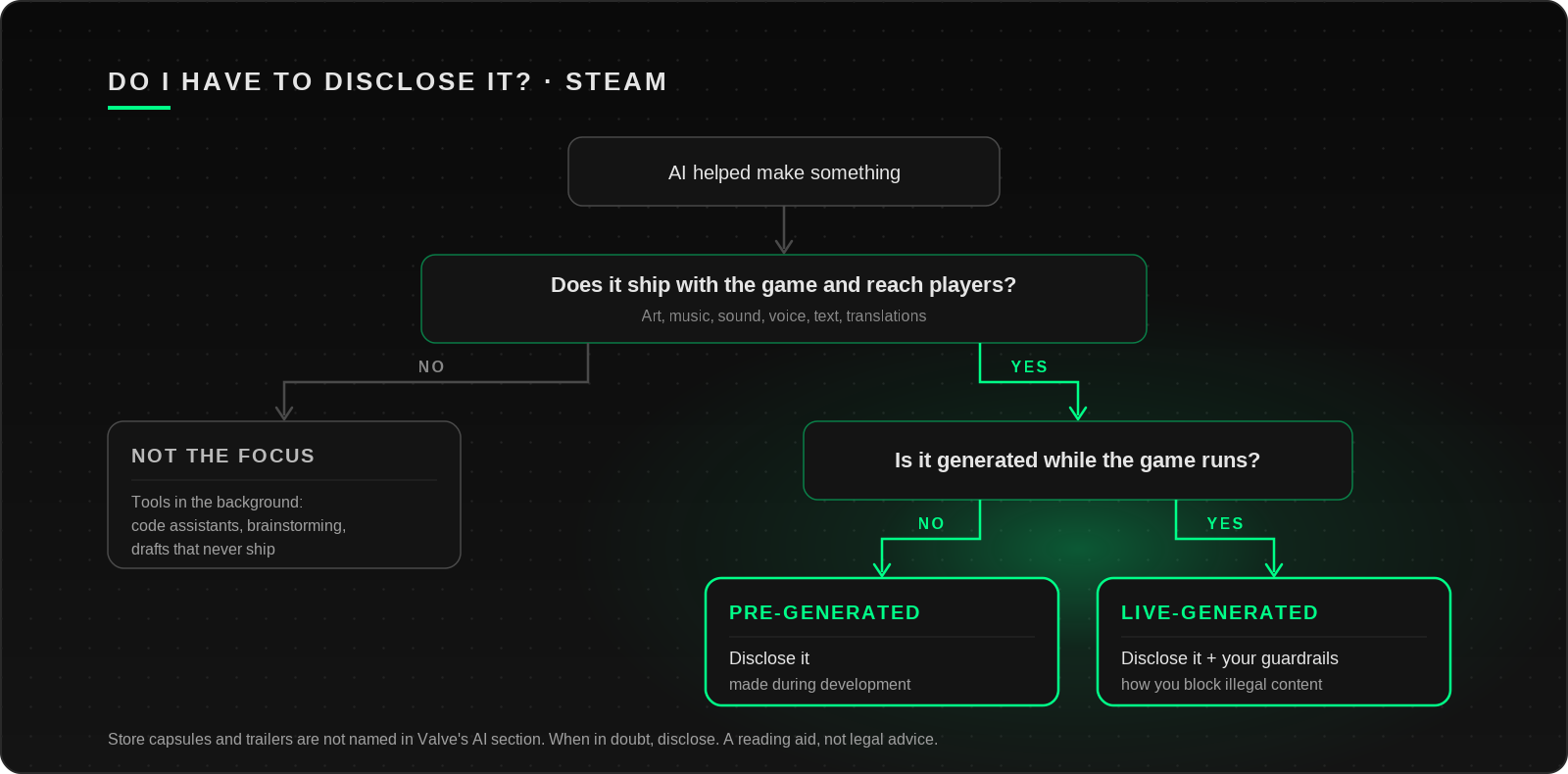
Instead, the section is about AI used to create content that ships with your game and is consumed by players. Valve splits that content into two kinds:
- Pre-Generated: content that ships with your game and is consumed by players, created with the help of AI tools during development
- Live-Generated: content created with the help of AI tools while the game is running
That gives you the three outcomes in the diagram above. Here is how the items from your inventory typically land.
Background tools: not the focus
A code assistant, brainstorming with a chatbot, generated reference images you looked at and threw away. None of this ships, and none of it reaches a player. By Valve’s wording, this is the efficiency side the section is not about.
That shift is fairly recent. When Valve introduced the AI questions in January 2024, its definition of pre-generated content still listed “art/code/sound/etc” (VGC). The current wording only talks about content that ships and is consumed by players. In January 2026, Notebookcheck reported that Valve had quietly updated the form in this direction.
Concept art and placeholders are a special case. The documentation does not name them. If they never end up in the build, they fall on the “not the focus” side by the wording. As soon as a single generated placeholder ships, it is pre-generated content like everything else.
Pre-generated: disclose it
Generated sprites, textures, backgrounds, music, sound effects, voice lines, dialogue and translations that ship in the build. Painting over the output by hand does not change where it came from. The content was still “created with the help of AI tools”, so by the wording it belongs here.
Store material is less clear. Valve’s AI section does not mention capsules, screenshots or trailers. It only reminds you that under the Steam Distribution Agreement your game has to be consistent with your marketing materials. Notebookcheck’s summary of the reworked form says store page descriptions and marketing materials count as well. Valve’s own page does not say that, but it costs you nothing to be safe: if your capsule or trailer was made with AI, mention it.
Live-generated: disclose it and describe your guardrails
If your game generates content while it runs, Valve asks for more. You need to tell Valve what guardrails you put on your AI to make sure it does not generate illegal content. When Valve announced the rules in 2024, it added that players can report content that should have been caught by those guardrails through the in-game overlay (VGC). If you are planning a game like that, think about the guardrails before you think about the store page.
Step 3: Write Your Steam Disclosure
What you enter does not stay hidden in Steamworks. Players see it on your store page in a section called AI Generated Content Disclosure, below “About This Game”. You can see an example on the store page of THE FINALS.
That makes the text part of your marketing, and a vague text works against you. Compare these two:
- “AI tools may have been used during development.”
- “Some background textures in the forest levels were created with an image generator and painted over by hand. All characters, animations and UI were drawn by hand.”
The second one tells players exactly what they get. Name the type of content, where it appears and how much of the game it is. If you replaced generated assets before release, you do not need to apologize for them. They are not in the game.
Step 4: Fill In the itch.io Disclosure
itch.io asks the same question in a different way. Its Quality Guidelines ask you to “accurately tag your project if it contains materials produced by generative AI”. You do that in the AI Disclosure section on your project’s edit page.
When itch.io introduced the field in 2024, it described the follow-up questions in its announcement: if you answer yes, you pick what kind of content is affected, such as graphics, sound, text and dialog, or code. The matching tags are added automatically, so you do not need to tag your project by hand.
Three details are worth knowing:
- It is stricter for some page types. itch.io strictly enforces the disclosure for game asset, soundtrack, physical game, comic and book pages, citing the legal ambiguity around rights to generative AI content. Failure to tag these pages may result in delisting. If you sell a sprite pack, this applies to you. For assets, the 2024 announcement also made clear that generated material counts “even if modified afterwards”.
- Classic game AI does not count. NPC pathfinding, enemy behavior patterns, procedural level generation, fuzzy logic, dynamic difficulty adjustment, dynamic music and similar systems are not considered generative AI and do not need to be disclosed. A roguelike with generated dungeons is not “AI generated” in this sense.
- Players see the answer. Projects that disclose generative AI appear on itch.io’s AI Assisted browse page. Answering no adds a “No AI” tag instead. In November 2026, itch.io started adding disclosure filters to more parts of the site, including search results (gaming.net).
Step 5: Decide Where Your Own Pixel Art Matters Most
Once your inventory is sorted, you have a clear picture of what you would have to declare. That is a good moment to ask a second question: which of these assets would you rather make yourself?
You do not have to redraw everything. Start where players look first and longest:
- The player character. Players see it every second of the game. A small hand-drawn sprite in 16×16 or 32×32 is achievable even if you have never drawn before.
- The store capsule and screenshots. They are the first thing anyone sees of your game, and they sit right next to your disclosure.
- The tiles players walk on. A small, consistent tileset makes a whole game look designed.
For a first game, a game jam is a good place to practice exactly this: few assets, one palette, a deadline. The Game Jam Art Survival Guide shows how to plan that, and the Aseprite Beginner Guide gets you set up in an evening.
Common Mistakes
Forgetting the placeholders
Generated placeholders that survive into the release build are the most likely gap in a disclosure. Check your final build against your inventory before you submit.
Thinking hand edits make it “not AI”
Painting over a generated image is real work, but the starting point still came from a generator. itch.io says this directly for assets, and Steam’s wording (“created with the help of AI tools”) covers it too. Declare it and describe the edits. That is the honest version, and it reads better anyway.
Forgetting the store page
Your capsule, screenshots and trailer are what most people see of your game. Valve’s AI section does not name them, but if AI made them, mentioning them is the safe side.
Declaring classic game AI
Pathfinding, behavior trees and procedural generation are not generative AI in the stores’ sense. Declaring them only confuses players who filter for it.
Writing a vague disclosure
“May have used AI tools” makes players assume the worst. Say what, where and how much.
Checking the rules once
Steam’s form changed in January 2026, and itch.io extended its filters and the page types it enforces in November 2026. Open the current pages before every release, not just before the first one.
What You’ve Learned
- Steam cares about AI content that ships and reaches players, not about tools in the background
- The difference between pre-generated and live-generated content, and why live-generated content needs guardrails
- How to write a disclosure that tells players exactly what they get
- How itch.io’s disclosure works, where it is strictly enforced and what does not count as generative AI
- Where your own pixel art makes the biggest difference
A clear disclosure is not a confession. It is a product description, and players reward honest ones. If you want to make more of your game yourself, start with Pixel Art Fundamentals and draw your player character first.
Transparency note: the title image of this guide was created with AI.